9 Best DJ Software For Windows: Free & Pro Picks
(2026)
Whether you're bedroom mixing or preparing sets for a packed club, your choice of DJ software for Windows can make or break your workflow. Windows remains the platform of choice for a huge chunk of DJs worldwide, yet picking the right program isn't straightforward, the options range from free open-source tools to full-blown professional suites with steep price tags.
At RIKIO ROCKS, we cover the EDM scene from every angle, the artists, the events, and the gear that makes it all happen. Software sits at the core of modern DJing, and we've spent time testing and comparing the tools that Windows-based DJs actually rely on in 2026. From beat-matching basics to advanced performance features, the differences between these programs matter more than most "top picks" lists let on.
Below, you'll find 9 DJ software options for Windows broken down by what they do well, where they fall short, and who they're built for. Whether you're just getting started or looking to upgrade from your current setup, this guide will help you spend your money (or save it) wisely.
1. rekordbox
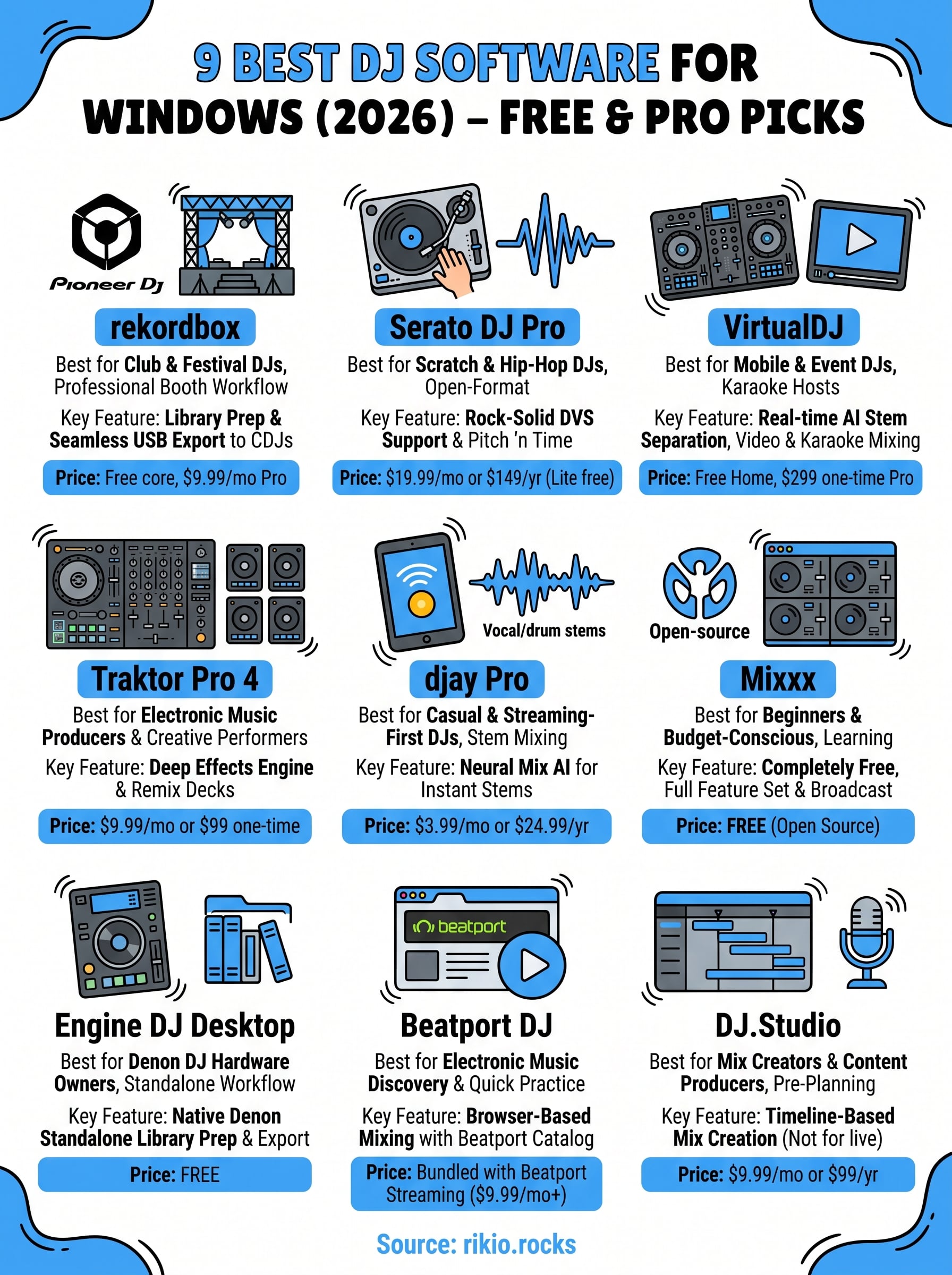
rekordbox is Pioneer DJ's own platform, and if you plan to play at clubs or festivals, it's arguably the most essential DJ software for Windows you can learn. The majority of professional DJ booths worldwide run Pioneer CDJ players and DJM mixers, which means your rekordbox library and prep work transfer directly to the gear you'll find on any professional stage.
What it does best on Windows
Pioneer actively maintains driver support and Windows compatibility across its full hardware lineup, so setup on Windows 10 and 11 rarely causes headaches. Library preparation is where rekordbox genuinely separates itself from every other option on this list. You can analyze tracks, set cue points, build playlists, and export everything to a USB drive that works seamlessly with any Pioneer CDJ in the world.
If you regularly play at venues with Pioneer setups, rekordbox is less of an option and more of a practical requirement.
Best for
rekordbox fits DJs who gig at clubs or festivals regularly, as well as bedroom producers who want their prep workflow to mirror professional setups. It also suits anyone who already owns a Pioneer DJ controller and wants native software support out of the box.
Standout features to know
The software includes beatgrid editing, hot cues, memory cues, loops, and a full performance mode with mixer effects. The export mode lets you carry your entire prepared library on a USB drive, no laptop required at the venue.
Hardware and club workflow fit
Pioneer DJ controllers like the DDJ-400, DDJ-FLX4, and DDJ-REV7 all work plug-and-play with rekordbox as their native software. The USB export workflow sets this program apart from nearly every other option on this list, since your cue points, loops, and track analysis all carry over to CDJ units without any extra steps.
Streaming and library management
rekordbox supports SoundCloud Go+, Tidal, and Beatsource streaming integrations, though streaming tracks cannot be exported to USB. Local library management is strong, with fast search, smart playlists, and waveform analysis built in.
Pricing and licensing
The core library prep and export features are completely free. The full Performance Plan, which unlocks all effects, DVS support, and advanced features, runs $9.99 per month. Pioneer DJ controllers often include a free license period bundled in the box.
2. Serato DJ Pro
Serato DJ Pro is the go-to option for scratch DJs, hip-hop turntablists, and open-format performers. Its reputation for rock-solid stability and tight DVS integration has kept it in DJ booths and on performance riders for over a decade.
What it does best on Windows
Serato runs cleanly and reliably on Windows 10 and 11, with low-latency audio performance that holds up during demanding live sets. If your workflow involves fast cue juggling or scratch routines, the waveform display and pitch-accurate beatgridding keep your library prep tight and organized.
Best for
Serato fits scratch DJs, hip-hop artists, and open-format club DJs who need solid DVS support or prefer performing on turntables and mixers over all-in-one controllers.
Standout features to know
Serato Flip lets you create and save custom cue point sequences, turning repeatable edits into a core part of your live set. The software also bundles Pitch 'n Time for key-locked tempo control and a built-in sampler for live remixing.
Serato's cue point behavior during live performance is some of the most responsive you'll find in any DJ software on Windows.
DVS and scratch workflow notes
Digital Vinyl System support is included at the Pro level, letting you control tracks with timecoded vinyl or CDs. This setup gives you the feel of real vinyl with the flexibility of a full digital library behind it.
Hardware compatibility basics
Serato works with certified gear from Pioneer DJ, Rane, Denon, and Numark, covering controllers, mixers, and standalone turntable setups.
Pricing and licensing
Serato DJ Pro costs $19.99 per month or $149 per year, with a free lite version available for basic mixing.
3. VirtualDJ
VirtualDJ has been around since 2003, and it remains one of the most widely used options for event DJs who need a flexible, all-in-one platform. Few programs match its breadth of built-in features right out of the box, which makes it a strong contender for DJs working across multiple contexts and formats.
What it does best on Windows
VirtualDJ runs smoothly on Windows 10 and 11, and its hardware detection is exceptionally broad, covering more controllers than virtually any other program on this list. If you have older gear sitting around, there's a good chance VirtualDJ supports it without extra configuration.
Best for
This software fits mobile DJs, event entertainers, and karaoke hosts who need one program to handle music, video, and requests in a single package.
Standout features to know
VirtualDJ includes AI-powered stem separation, letting you isolate vocals or instruments from any track in real time. The built-in video mixing engine and robust sampler add serious performance depth without requiring third-party plugins.
For mobile and event DJs, VirtualDJ packs more ready-to-use tools into one install than any other DJ software for Windows on this list.
Video, karaoke, and event workflows
The software handles video files and karaoke CDG formats natively, which eliminates the need for a separate karaoke application at events.
Hardware compatibility basics
VirtualDJ supports over 300 controllers from brands including Pioneer DJ, Numark, Hercules, and Denon.
Pricing and licensing
The free version covers home use with no hardware connected. The Pro Infinity license costs $299 as a one-time purchase or $19 per month.
4. Traktor Pro 4
Traktor Pro 4 is Native Instruments' flagship DJ platform, built for DJs who prioritize effects depth and creative performance over a traditional club-export workflow. It has earned a dedicated following among electronic music artists who want their software to feel more like an instrument than a media player.
What it does best on Windows
Traktor runs reliably on Windows 10 and 11, with solid ASIO driver support that keeps latency low during live performance. The software's waveform display and beatgrid system are precise, making track analysis quick and accurate across large libraries.
Best for
Traktor fits techno, house, and electronic music DJs who perform on Native Instruments hardware or want granular control over effects and mixing. It also suits producers who DJ and want a performance tool that connects naturally to their studio workflow.
Standout features to know
Traktor's Remix Decks let you trigger samples and loops alongside your main tracks, turning a standard two-deck mix into a layered live performance. The Stem playback feature separates tracks into individual elements so you can blend and manipulate them mid-set.
Effects, looping, and performance workflow
The effects engine in Traktor ranks among the most powerful available in any DJ software for Windows, with over 40 options including Reverb, Filter, and Flanger. Loop recording and manual beatgridding give you tight control during complex transitions.
Traktor's effects routing lets you chain multiple units per deck, which opens creative possibilities no other platform on this list matches.
Hardware mapping and controller support
Native Instruments builds its Traktor Kontrol series specifically around this software. You can also map third-party controllers using the flexible MIDI mapping system built directly into the settings panel.
Pricing and licensing
Traktor Pro 4 costs $9.99 per month as part of a Native Instruments subscription or $99 as a one-time purchase through their website.
5. djay Pro
djay Pro from Algoriddim is a streaming-first DJ software for Windows that builds its workflow around AI-powered stem separation and direct access to major streaming catalogs.
What it does best on Windows
djay Pro runs well on Windows 10 and 11, keeping CPU load light even on modest hardware. The interface loads quickly and stays responsive during live sessions without requiring high-end specs.
Best for
This software fits casual and event DJs who want to skip local library management entirely. It works best for:
-
Bedroom DJs building their first setup without a large local file collection
-
Event performers who rely on streaming access rather than pre-loaded drives
- DJs exploring stem mixing without committing to expensive hardware
Standout features to know
The flagship tool is Neural Mix, which separates any track into vocals, drums, and instruments in real time without any pre-processing required.
Neural Mix lets you reshape tracks on the fly, making djay Pro one of the more creative options on this list of DJ software for Windows.
You can mute or blend individual stem layers during a live mix, opening up transitions that standard two-track mixing simply cannot achieve.
Streaming-first workflow and offline options
djay Pro integrates with Tidal and SoundCloud Go+ for on-demand track access. Your catalog depends entirely on your active streaming subscription, so offline caching helps bridge gaps when connectivity is limited.
Stems and beatgridding strengths
The beatgridding engine works accurately on streaming tracks without requiring local files to pre-analyze. Stem separation stays reliable across most genres, though dense electronic productions can occasionally produce bleed between layers.
Pricing and licensing
djay Pro costs $3.99 per month or $24.99 per year, making it one of the most affordable paid options on this list.
|
Plan
|
Price
|
|
Monthly
|
$3.99/month
|
|
Annual
|
$24.99/year
|
6. Mixxx
Mixxx is the only fully free, open-source option on this list, and it delivers a surprisingly complete feature set without charging you a cent. For DJs on a tight budget who still want a capable DJ software for Windows, Mixxx removes every financial barrier to getting started.
What it does best on Windows
Mixxx runs on Windows 10 and 11 without requiring any paid license or subscription. The software is lightweight and stable, meaning it performs well even on older hardware that other programs might struggle on.
Best for
Mixxx works best for beginner DJs and budget-conscious performers who want to learn core mixing skills before spending money on commercial software. It also suits hobbyists who prefer open-source tools on principle.
Standout features to know
Mixxx includes four virtual decks, a built-in equalizer, looping tools, and a BPM detection engine that handles most genres accurately. You also get a broadcast streaming feature built directly into the settings, letting you go live without third-party plugins.
For a free program, Mixxx covers more ground than most beginners will ever need.
Controller support and MIDI mapping
Mixxx supports hundreds of MIDI controllers through community-built mapping files. You can also create custom mappings through the built-in MIDI mapper if your specific hardware lacks an existing profile.
Library prep and performance workflow
The track analysis and cue point system covers the basics cleanly, though it lacks the depth of rekordbox or Serato for complex prep work. Your playlists and crates organize easily within the built-in browser.
Pricing and licensing
Mixxx is completely free with no paid tiers, subscriptions, or locked features.
7. Engine DJ Desktop
Engine DJ Desktop is Denon DJ's free library management and performance software, built specifically to support their standalone media players and controllers. If you own any Denon DJ hardware, this is the native software that connects your Windows machine to your gear.
What it does best on Windows
Engine DJ Desktop installs cleanly on Windows 10 and 11 and focuses on giving you a fast, reliable way to prep your music library before you hit the decks. The software analyzes tracks, sets beatgrids, and syncs everything to Denon's standalone players without the friction you get when cross-referencing third-party libraries.
Best for
This software fits Denon DJ hardware owners and DJs who want a standalone performance setup without needing a laptop on stage. It works well for DJs transitioning away from a laptop-dependent workflow.
Standout features to know
Engine DJ Desktop supports hot cues, loops, and smart playlists alongside a waveform editor that lets you correct beatgrids manually. The track analysis engine handles most genres accurately and stores everything in a format your Denon standalone gear reads instantly.
If you own a Denon SC6000 or Prime series player, Engine DJ Desktop is the most direct path from your Windows library to the booth.
Standalone gear workflow and exports
You export your prepared library to a USB drive or SD card, and your cue points, loops, and playlists carry over completely to supported Denon hardware.
Streaming and library management
Engine DJ Desktop connects to Tidal and SoundCloud Go+, though streaming tracks follow the same export restrictions found in most other platforms on this list.
Pricing and licensing
Engine DJ Desktop is completely free with no subscription required.
8. Beatport DJ
Beatport DJ is a browser-based mixing platform built directly into the Beatport store, letting you mix tracks straight from one of the largest electronic music catalogs in the world without installing any dedicated software.
What it does best on Windows
Beatport DJ runs entirely in your web browser on Windows 10 and 11, which means zero installation and no driver conflicts to troubleshoot. If you already browse Beatport for new releases, you can move from discovery to mixing in seconds without switching apps.
Best for
This platform fits electronic music DJs who spend significant time on Beatport buying or streaming tracks and want to mix directly from their collection. It works well as a secondary tool for quick practice sessions rather than a primary performance setup.
Standout features to know
Beatport DJ includes sync, looping, and basic EQ controls built directly into the browser interface. The track analysis happens automatically on the platform side, so your beatgrids load ready to use without any local pre-processing.
For DJs deep in the electronic music world, no other DJ software for Windows puts your purchase history and mixing tools on the same screen.
Browser-based workflow and limitations
The browser environment caps what you can do compared to installed software. You get limited effects, no DVS support, and no offline access without an active internet connection.
Streaming catalog and discovery strengths
Beatport's catalog covers house, techno, drum and bass, and dozens of other electronic genres at a depth no general streaming platform matches.
Pricing and licensing
Beatport DJ access comes bundled with a Beatport streaming subscription, starting at $9.99 per month.
9. DJ.Studio
DJ.Studio takes a different approach from every other DJ software for Windows on this list. Instead of building around live performance, it focuses on pre-planned mix creation, letting you map out transitions, arrange full sets, and export polished mixes without touching a traditional deck layout.
What it does best on Windows
Running cleanly on Windows 10 and 11, DJ.Studio keeps its interface centered on a timeline-based workflow that feels closer to a DAW than a traditional DJ program. Track arrangement happens on a horizontal timeline where you drag, trim, and sequence transitions visually before committing to a final output.
Best for
This software fits mix creators and content producers who want to publish DJ sets to SoundCloud, YouTube, or podcast platforms. It works well for DJs who plan their sets in advance rather than improvising during a live show.
Standout features to know
DJ.Studio includes automatic harmonic mixing suggestions and beat-aligned transition markers that remove most of the manual alignment work. The built-in SoundCloud and YouTube integration lets you import your existing libraries directly without re-uploading files.
If your goal is producing a polished recorded mix rather than performing live, DJ.Studio removes friction from every step of that process.
Mix planning vs live performance fit
The software is built purely for pre-production and recorded output, not real-time performance. You won't find DVS support, controller mapping, or effects chains anywhere in the program.
Export options and workflow handoff
Your completed mix exports as a high-quality audio file, ready for direct upload to streaming or podcast platforms without any additional conversion steps.
Pricing and licensing
DJ.Studio costs $9.99 per month or $99 per year, with a free trial available to test the full workflow before committing.
Where to start
Picking the right DJ software for Windows comes down to three things: your hardware, your goals, and your budget. If you play clubs regularly, rekordbox gives you the most direct path from your bedroom to a professional booth. If you're just starting out and want to avoid spending money before you know what you need, Mixxx covers every core skill without costing you anything.
From there, match the software to your actual workflow. Serato fits scratch and open-format DJs, Traktor fits effects-heavy electronic sets, and VirtualDJ fits mobile and event work. DJ.Studio serves a completely different purpose from all of them, so don't treat it as a live performance tool when your goal is producing recorded mixes.
Once your setup is locked in, you'll need high-energy tracks to practice with. Browse our CARDIO HITS 2026 playlist on Spotify for driving, beat-forward selections that work well in both practice sessions and live sets.
11