DistroKid Help Center: How to Get Support Fast
You uploaded your track, the release date is locked in, and suddenly something breaks. A payment fails, a track gets stuck in review, or your distribution status just won't budge. If you've been Googling the distrokid help center trying to find an actual human or a working link, you already know the frustration: no phone number, a maze of FAQ articles, and a support ticket system that isn't always obvious to navigate.
This guide cuts through that. We'll show you exactly where to find DistroKid's real support channels, what response times to expect, and how to word your ticket so you get a useful answer instead of a canned reply. Whether you're dealing with a subscription billing issue, a stuck upload, or a royalty payout question, there's a specific path to resolution, and we'll point you straight to it.
As a daily source for EDM producers and DJs tracking releases, remixes, and drops, we see how often distribution hiccups derail a launch. So we've laid out the fastest ways to reach DistroKid support, the self-service tools worth trying first, and the mistakes that slow down your ticket. By the end, you'll know exactly how to get unstuck, fast.
What the DistroKid Help Center can do for you
Before you fire off a support ticket, it helps to know what's actually inside the DistroKid help center. This isn't just a static FAQ page. It's a searchable knowledge base covering everything from setting up split payments to fixing rejected artwork, and most of it gets updated as DistroKid rolls out new features. If you've never poked around in there, you're probably missing a faster fix than waiting on a support reply.

Typically, the help center is organized into topic clusters that match the pain points artists actually run into. You'll find sections dedicated to uploads and releases, royalty statements, subscription and billing, YouTube Content ID, and Shazam or Spotify verification. Each cluster contains dozens of short articles written to answer one specific question, not a wall of text you have to dig through.
Here's a quick breakdown of what you'll typically find there:
|
Category
|
What it covers
|
|
Uploads & Releases
|
Track rejections, metadata errors, release date changes
|
|
Royalties & Payouts
|
Payment schedules, missing earnings, PayPal issues
|
|
Subscription & Billing
|
Plan upgrades, failed charges, cancellations
|
|
Platform Verification
|
Spotify for Artists, Shazam, YouTube Official Artist Channel
|
|
Distribution Status
|
Pending, live, or takedown statuses explained
|
Beyond the articles themselves, the help center doubles as the entry point for every other support channel DistroKid offers. You won't find a separate "contact us" page floating around; instead, the ticket form, the chat widget, and the escalation path all live behind the same search bar. That's by design. DistroKid wants you to try self-service first, and honestly, it often works.
Most account issues get solved faster by searching the help center than by waiting for a reply.
Getting familiar with this hub before you're mid-crisis saves real time. If your release date is two days out and something's stuck, you don't want to be learning the interface for the first time under pressure. Bookmark it now, so when a real issue hits, you already know where everything lives.
Step 1. Search the Help Center for instant answers
Start every support issue by typing your problem straight into the DistroKid help center search bar, not the general Google search. The internal search matches against actual DistroKid terminology, so a query like "track stuck in review" or "failed payout" pulls up the exact article instead of generic advice from a forum thread. Skip vague phrases and use the same words DistroKid uses in its own interface, since that's what the search index is built around.
Use specific search terms
Try these instead of broad guesses:
- "Release rejected" instead of "my song won't upload"
- "Payout pending" instead of "where's my money"
- "Cancel subscription" instead of "stop paying"
- "Split payment not showing" instead of "collaborator issue"
Narrow phrasing like this surfaces the right article on the first try more often than not.
Search using DistroKid's own wording, not your own description of the problem, and you'll skip the wait entirely.
Check the article's last updated date
Before trusting an article, glance at when it was last revised. DistroKid updates pricing, royalty timelines, and platform policies often, so an article from two years ago might describe a process that's since changed. Recent articles carry more weight, especially for anything involving billing cycles or distribution deadlines, since those details shift as DistroKid adjusts its plans and partner agreements.
Step 2. Submit a support ticket for your issue
When the help center articles don't fix your problem, submit a support ticket rather than hunting for a phone number that doesn't exist. DistroKid handles support almost entirely through ticketing, and you get there by scrolling to the bottom of any help article and clicking "Contact Support" or the equivalent prompt. From there, pick the category that matches your issue since that routing decides which team sees your request first.
A specific, well-tagged ticket gets answered faster than a vague message dropped into the wrong queue.
Write a ticket that gets a real answer
Generic messages like "my upload isn't working" get generic replies. Give the support team enough to act on immediately:
- Your artist or release name exactly as it appears in your account
- The UPC or ISRC code if you have one
- A screenshot of the error or status message
- The date you expect the release to go live
- What you already tried from the help center
Set realistic expectations on timing
Response times usually run between 24 and 72 hours, though billing and takedown requests sometimes move faster since they're flagged as urgent. Don't submit three duplicate tickets hoping one gets prioritized. That splits your case history across multiple threads and actually slows things down, since each new agent has to piece together context from scratch.
Step 3. Chat with Dave or a live agent
If your ticket sits unanswered or you need a quicker back-and-forth, try the chat widget inside your DistroKid dashboard. You'll usually meet Dave, DistroKid's chatbot, first. He's built to handle common questions about upload status, royalty timing, and subscription changes, and he pulls answers straight from the same knowledge base you already searched. Don't dismiss him as a dead end; Dave often resolves simple status checks in under a minute, faster than waiting on a ticket queue.

Dave handles the routine stuff fast, but knowing when to push past him to a human is what actually saves you time.
When to escalate past Dave
If Dave can't answer your question after two or three tries, ask directly for a live agent. Type something like "connect me to a human" or "I need a person" and the chat typically escalates your case rather than looping you through more bot replies. Live chat access isn't guaranteed 24/7, so if agents are offline, your conversation converts into a support ticket automatically, keeping your context intact.
What to have ready before you chat
Have these details open before you start typing, so you're not scrambling mid-conversation:
- Your account email and artist name
- The specific release or track affected
- Any error message text, copied exactly
- What Dave already told you, if anything
This keeps the conversation moving instead of restarting your explanation twice.
Step 4. Email DistroKid support as a backup
Email isn't DistroKid's main support channel, but it becomes useful once you've already opened a ticket. Every ticket generates a confirmation email, and replying directly to that thread often reaches a human faster than starting a new request through the distrokid help center form. This keeps your case history intact instead of forcing an agent to re-read your whole situation from scratch.
Reply to your existing ticket thread
Don't create a brand-new ticket if you already have one open. Just hit reply on the confirmation email and add:
- Any new screenshots or error messages
- A short recap of what's changed since your last update
- Your release UPC so the agent doesn't have to search for it
Replying to an existing thread keeps your case moving; starting a new ticket resets the clock.
Expect slower turnaround during release-heavy weeks
Email replies typically land within the same 24 to 72 hour window as tickets, but Fridays and the days around major release date pushes tend to run slower since everyone's uploads cluster at once. If you haven't heard back after three business days, reply again to the same thread rather than emailing a second address. Patience here pays off more than persistence across five different channels.
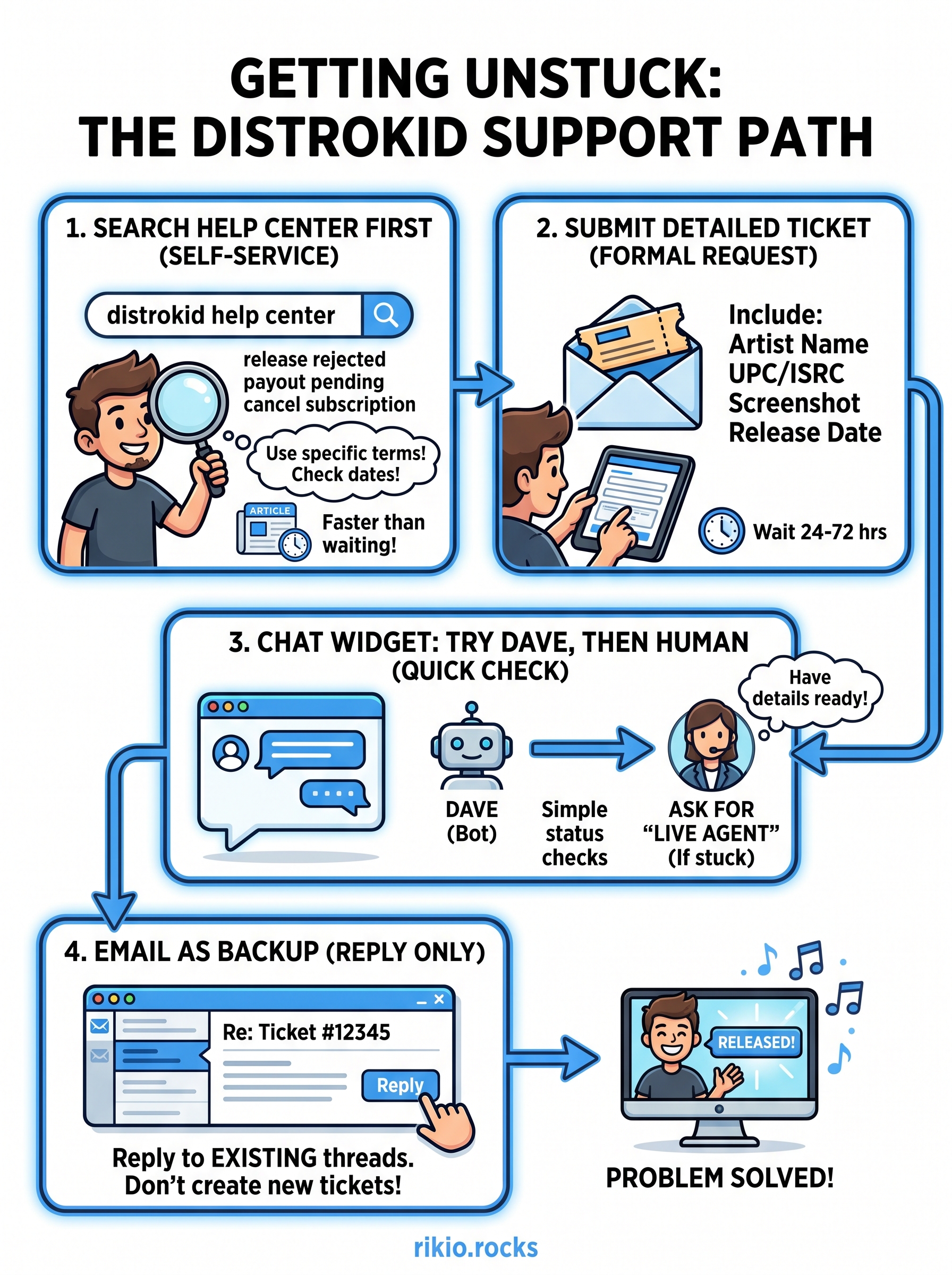
Getting the help you need, faster
Getting stuck on a distribution issue feels worse when your release date is bearing down on you, but you now have a real path through it. Start with the help center search, let Dave handle the routine questions, and escalate to a ticket or a live agent when the answer isn't there. Skip duplicate tickets, keep your case in one thread, and give agents the specifics they need on the first try. That's the whole system, and it works faster once you know the order to use it in.
Most delays come from guesswork, not from DistroKid being slow. Follow these steps in order and you'll cut your wait time down significantly, release after release.
While you wait on that reply, keep your momentum going. Queue up our CARDIO HITS 2026 playlist on Spotify and stay tuned to what's dropping next in EDM.
3