What Does An Audio Interface Do? Inputs, Outputs, And
Sound
If you've ever wondered what does an audio interface do, you're asking one of the most foundational questions in music production. Whether you're recording vocals over an EDM track or routing hardware synths into your DAW, an audio interface is the device that sits between your gear and your computer, converting analog signals to digital data and back again. It sounds simple, but the details matter more than most producers realize.
At RIKIO ROCKS, we cover electronic dance music from every angle, the artists, the festivals, the releases, and the production tools that make it all possible. Audio interfaces land right at the center of that last piece. They're essential studio gear, and understanding how they work gives you a real advantage whether you're building your first home studio or rethinking a setup that's holding you back.
This article breaks down exactly how an audio interface handles inputs, outputs, and sound quality. You'll learn what's happening inside the box, which features actually matter for your workflow, and how to tell if you need one for your specific situation. Straight answers, practical context, everything you need to make a confident gear decision.
What an audio interface does in plain English
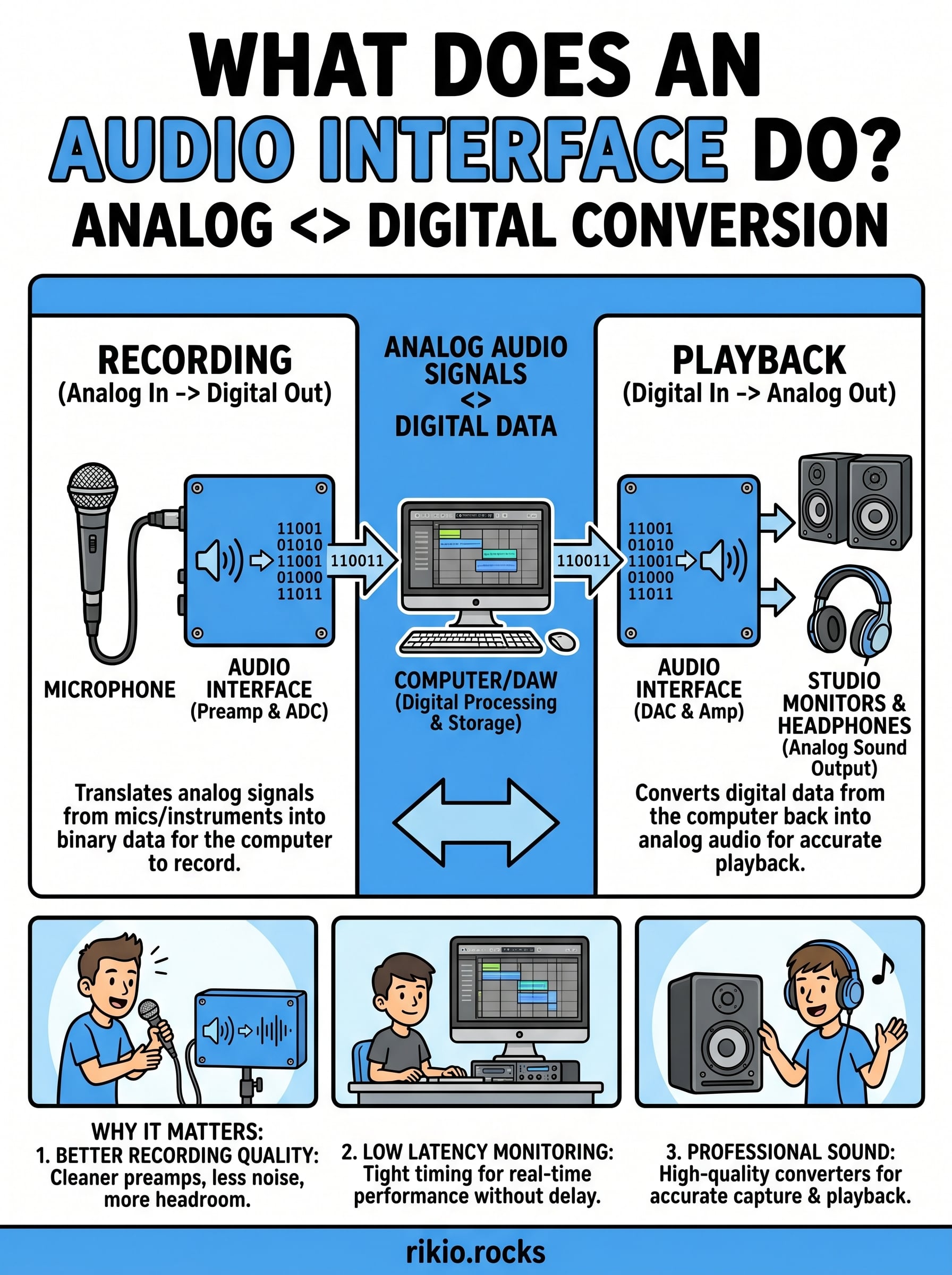
An audio interface is a hardware device that connects your microphones, instruments, and other gear to your computer. When you ask what does an audio interface do at its core, the answer is this: it translates analog audio signals into digital data your computer can record, process, and play back. Without one, your computer has no reliable way to capture high-quality audio from professional gear. The built-in sound card in your laptop handles basic audio tasks, but it was never designed for recording music. An audio interface fills that gap with dedicated hardware built specifically for the job.
The signal path from mic to computer
When you plug a microphone into an audio interface, the signal runs through a preamp circuit inside the device before anything else happens. That preamp boosts the mic signal from a very low level to a line level that the rest of the hardware can work with. From there, an analog-to-digital converter (ADC) samples the incoming audio at a set rate and converts it into binary data. That data travels over USB, Thunderbolt, or another connection to your DAW, where you can record, edit, and mix it.
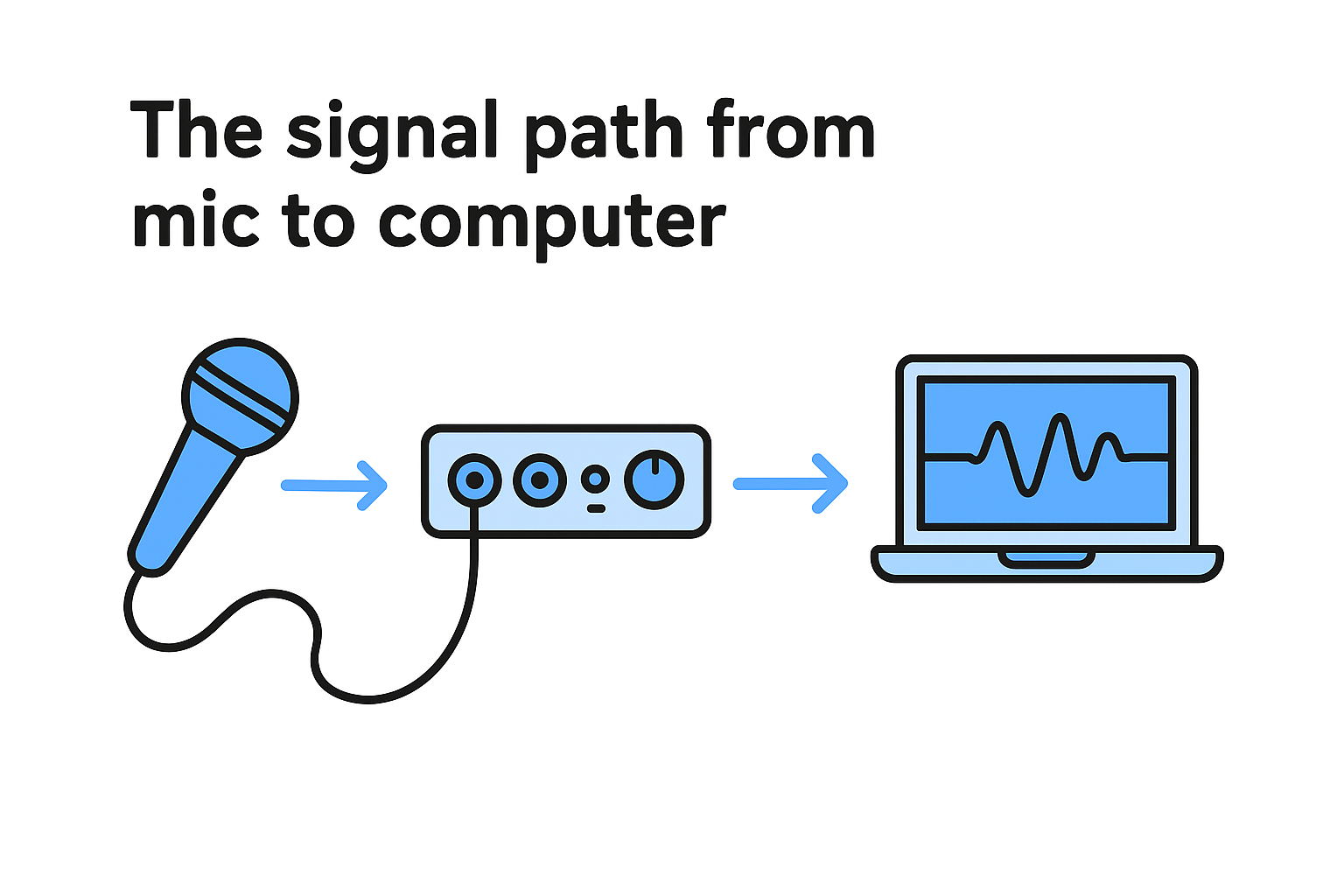
The process runs in reverse when you play audio back from your computer. Your DAW sends digital audio data back to the interface, where a digital-to-analog converter (DAC) turns it back into an electrical signal. That signal then travels to your studio monitors or headphones. The quality of the converters inside an interface determines how accurately your recordings capture the original sound and how faithfully playback represents your mix. Cheap converters add noise and color the sound in ways you never intended.
The quality of your converters is the single biggest factor in how professional your recordings will sound at the source.
Why your computer's built-in sound card isn't enough
Your laptop or desktop has a sound card built into the motherboard, but its purpose is consumer playback, not professional recording. It handles system sounds, video calls, and streaming well enough, but it picks up electrical noise from nearby components like the CPU and GPU. That noise shows up in your recordings as a low-level hiss or hum you can't always edit out after the fact.
A dedicated audio interface moves the audio processing outside the computer into a separate, shielded unit. This physical separation keeps electromagnetic interference away from your signal chain. On top of that, professional interfaces include proper mic preamps with phantom power for condenser microphones, balanced inputs that reject noise over long cable runs, and outputs designed to drive studio monitors at accurate levels. Your built-in sound card has none of that. For casual listening, it works fine. For recording anything you want to sound good, it falls short every time.
Built-in audio also introduces higher latency, meaning the delay between when a sound occurs and when you hear it through your monitors. Professional interfaces use dedicated DSP chips and optimized drivers that cut this delay down to just a few milliseconds, keeping your monitoring tight while you track. That responsiveness matters whether you're recording live vocals or playing a software synthesizer in real time.
Why an audio interface matters for recording and EDM
Understanding what does an audio interface do becomes even more relevant when you look at what changes the moment you start using one. Recording quality and monitoring accuracy both improve immediately, and for anyone working in EDM, that difference shows up in every element of a finished track, from the clarity of a synth lead to the depth of a sub bass.
How an interface changes your recording quality
When you record through a proper interface, every signal entering your chain starts cleaner. The dedicated preamps handle gain staging correctly, which means you capture more dynamic range without pushing levels into distortion. That headroom gives you more flexibility during mixing. You can shape the sound without fighting noise introduced at the recording stage.
Latency reduction is the other immediate gain. Recording with your computer's built-in audio creates delays that make real-time monitoring feel disconnected. A quality interface uses hardware-level monitoring, routing your input signal directly to your headphones or monitors with almost no delay. Tracking vocals or playing a software instrument in real time feels natural rather than frustrating.
Low latency monitoring is not a luxury for advanced setups. It is a basic requirement for recording anything that needs to feel in time.
Why EDM producers specifically need one
EDM production relies heavily on mixing hardware sources with software, and an audio interface is what makes that possible at a professional level. If you are running synthesizers, drum machines, or samplers through your setup, you need clean line inputs with enough headroom to handle the output levels from that gear without clipping. A standard sound card cannot provide that reliably.
Monitoring accuracy matters just as much. EDM tracks are built for large sound systems and high-end playback environments. If your monitor path introduces coloration or distortion at the output stage, you are not hearing your mix accurately, and the decisions you make during production will not translate well to other systems. A quality interface gives you a transparent signal path from your DAW to your monitors, so what you hear in your studio reflects what listeners will hear everywhere else.
Beyond recording and monitoring, routing flexibility lets you connect multiple sources at the same time. You can run a synth into one input while capturing a return from an outboard effects unit on another, all without changing cables or interrupting your session.
How audio interfaces handle sound conversion
Sound conversion is the core process that defines what does an audio interface do at a technical level. Every interface contains two key components: an analog-to-digital converter (ADC) and a digital-to-analog converter (DAC). These chips translate the continuous electrical signals from your microphones and instruments into binary data your computer can store and process, then reverse that process when you play your mix back through monitors or headphones. The quality of these converters determines how much of the original signal survives the round trip intact, which is why two interfaces at different price points can sound noticeably different even with identical gear connected to them.
How the ADC captures your signal
When a sound source sends an analog signal into your interface, the ADC samples that waveform at a fixed rate, measuring its amplitude thousands of times per second. Each measurement gets assigned a numerical value and stored as binary data. This is how your interface captures everything from a sung vocal to a synthesizer pad, translating continuous electrical variation into discrete numerical snapshots your DAW can record, edit, and process.
Sample rate determines how many times per second those snapshots occur. The standard for most professional work is 44.1 kHz or 48 kHz, meaning the converter measures the signal 44,100 or 48,000 times every second. Higher rates like 96 kHz capture additional high-frequency detail, though the practical audible benefit depends on your monitoring setup and your final delivery format.
The ADC in your interface sets a hard ceiling on the quality of every recording you make, regardless of how good your microphone is.
How the DAC sends audio back out
The DAC handles the return path. When your DAW sends digital audio data to the interface for playback, the DAC converts that binary stream back into a continuous analog signal. That signal travels to your studio monitors or headphones, reproducing the sound you mixed. A well-built DAC does this accurately, without adding harmonic distortion or noise. Cheaper interfaces cut corners on the DAC, which shows up as a dull or harsh quality in your monitoring and makes accurate mix decisions harder to trust.
Bit depth works alongside sample rate to set the dynamic range of your recordings. A 24-bit recording stores over 16 million possible amplitude values per sample, compared to 65,536 in a 16-bit recording. That extra resolution gives your signal significantly more room between the noise floor and the point of digital clipping, keeping quiet passages clean and louder transients intact without distortion.
How to understand inputs, outputs, and key specs
Understanding what does an audio interface do in practical terms means understanding the physical connections on the device itself. Every interface has a specific set of inputs for bringing audio in and outputs for sending it out. Beyond the connectors, a handful of specs determine how well the device handles your audio. Learning to read those specs before you buy saves you from choosing hardware that does not fit your actual workflow.
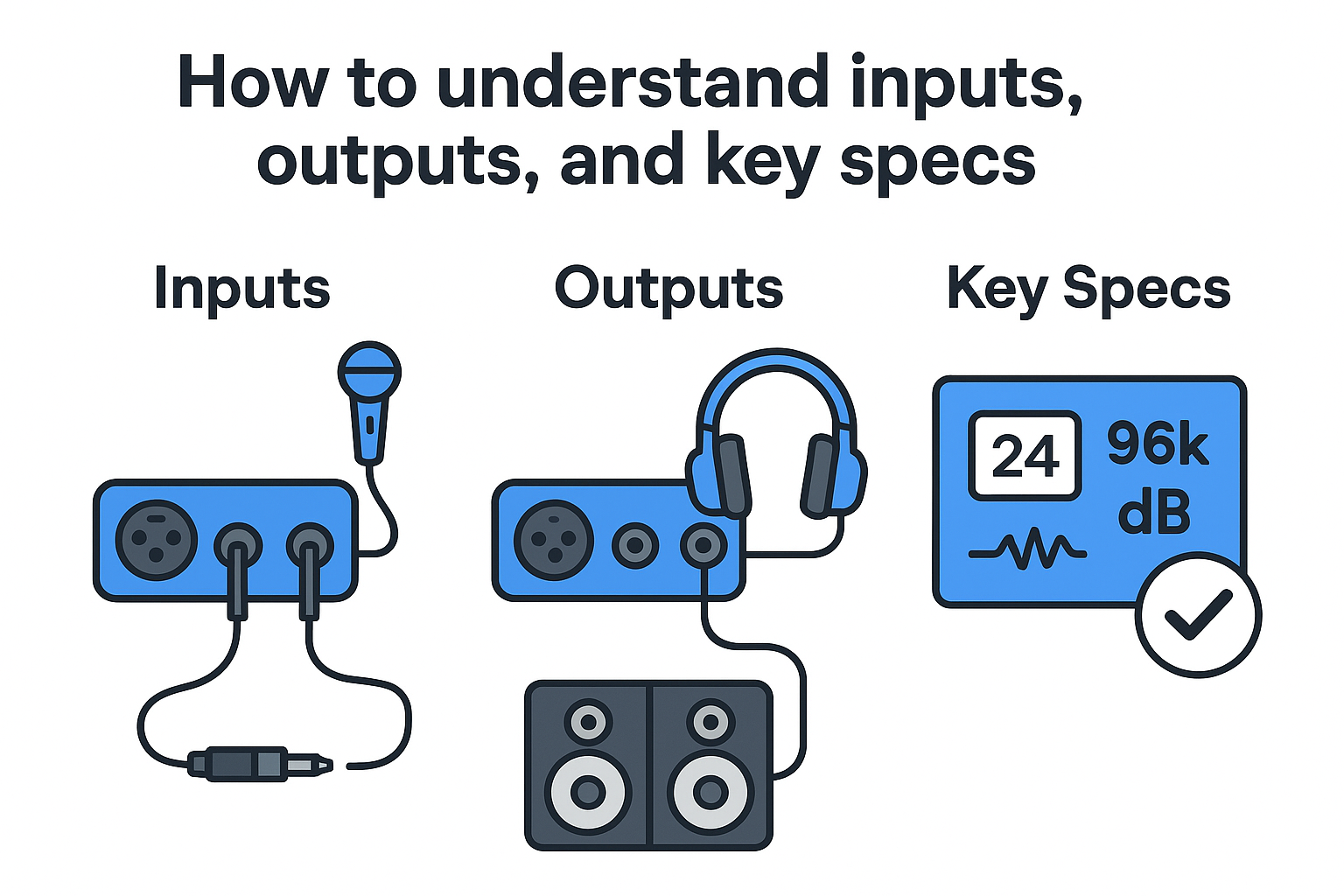
Inputs: what connects to your interface
The inputs on an interface are the entry points for every signal you record. Combo jacks are the most common type, accepting both XLR cables from microphones and quarter-inch cables from instruments or line-level gear in a single socket. Mic inputs include preamps and phantom power, which condenser microphones require to operate. If you need to record more than one source at the same time, the number of inputs on the interface sets your hard limit.
Most entry-level interfaces offer one or two inputs, which works well for solo producers recording one source at a time. If you run hardware synthesizers, drum machines, or outboard gear alongside microphones, you will need more inputs to keep everything routed cleanly without swapping cables mid-session.
Outputs: how audio leaves your interface
Outputs carry your audio from the interface to your studio monitors, headphones, or other external gear. Main outputs are typically balanced TRS connections that feed your studio monitors directly. A dedicated headphone output with its own volume control is standard on most interfaces and lets you monitor independently from your speakers.
Having a separate headphone output matters when you are tracking in a room where monitor bleed would interfere with your recording.
The specs that actually matter
Three specs define the performance ceiling of any interface: sample rate, bit depth, and dynamic range. Sample rate sets how many times per second the converter samples your signal. Bit depth determines how much dynamic range your recordings preserve between the noise floor and clipping. Dynamic range, measured in decibels (dB), reflects how wide the gap is between the quietest signal the interface can capture and the loudest before distortion sets in. A higher number means more headroom for clean recordings.
Most modern interfaces handle 24-bit/96kHz recording, which exceeds the requirements for professional music production. Focus on the dynamic range figure from the manufacturer rather than chasing the highest sample rate available, since that number tells you more about real-world performance than any other single spec.
How to choose the right interface for your setup
Choosing the right interface comes down to matching the hardware to what you actually do. Understanding what does an audio interface do for your specific workflow means looking at your signal sources, your computer setup, and the performance specs that align with your recording goals. Buying based on brand recognition or the most inputs available often leads to gear that either limits you unnecessarily or adds complexity you never needed.
Match the interface to your input count
The first question to answer is how many sources you need to record at the same time. If you record one microphone or instrument at a time, a two-input interface covers everything without adding cost or desk space. If your setup includes multiple synthesizers, a drum machine, and a microphone running simultaneously, you need at least four to eight inputs to avoid constant cable swapping that disrupts your session flow.
Think about your current setup and where it realistically goes in the next year. Buying an interface with slightly more inputs than you need right now is a reasonable hedge. Purchasing an eight-channel interface when you only ever record vocals and a single instrument adds cost without adding value.
Buy for the workflow you actually have, not the studio you might build someday.
Connection type and driver support
USB interfaces are the most widely compatible option and work on virtually every current laptop or desktop without additional hardware. Thunderbolt interfaces offer lower latency and higher bandwidth, which matters if you run large track counts, but they require a Thunderbolt port on your computer and typically cost more.
Driver quality affects your real-world experience more than most spec sheets suggest. Look for interfaces from manufacturers with a strong track record of maintaining driver updates across operating system versions. An interface that works flawlessly on your current OS but loses support after a system update becomes a liability fast. Checking user feedback on platforms like Amazon gives you a realistic picture of how an interface performs outside the manufacturer's controlled demo environment.
Finally, budget shapes every decision, but dynamic range and preamp quality matter more than sample rate when you compare options at similar price points. Prioritize converter performance and solid build quality over chasing feature counts, and you will end up with an interface that serves your recordings for years without needing to be replaced the moment your setup grows.
Where to go from here
You now have a complete picture of what does an audio interface do and why it matters at every stage of your production process. From the moment a signal enters your inputs to the moment audio reaches your monitors, the interface controls the quality of that entire path. Choosing the right device for your input count, connection type, and converter quality puts you in a position to record and mix with confidence instead of fighting gear that limits you.
Your next step is to take stock of what you actually plug in during a session and match that against the specs covered here. One solid interface chosen with your real workflow in mind will serve you better than any compromise piece of gear. While you are building out your production setup, keep the energy going with our CARDIO HITS 2026 Playlist on Spotify and stay current with the latest in EDM at RIKIO ROCKS.
130